
NT-NAU82011
Hardware Connection
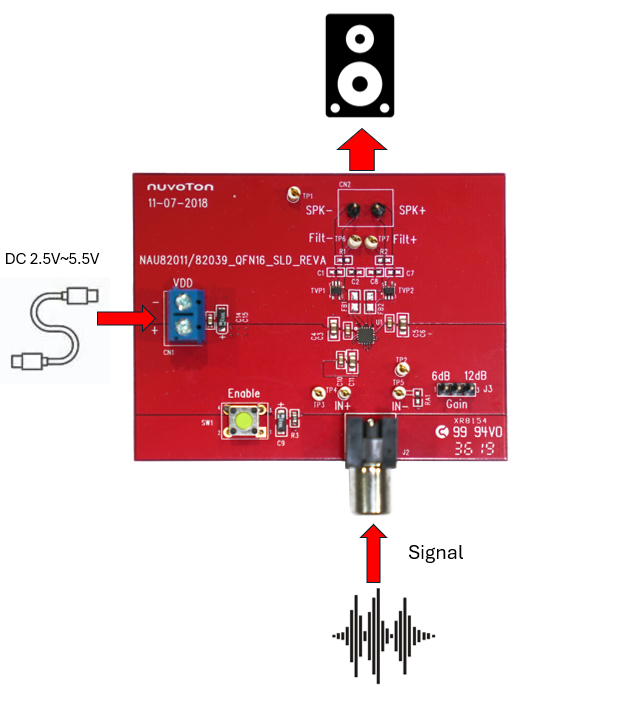
This section introduces a simple connection method for the NT-NAU82011 as Figure shows the audio signal path of NT-NAU82011.
- Connect the audio signal to J2 of the NT-NAU82011, and connect the speaker to CN2 of the NT-NAU82011.
- Connect the rated power VDD of the NT-NAU82011.

Gain setting
NAU82011 has a provision for variable gain setting by using external input resistors. The gain is expressed as the ratio of the internal feedback resistor of 300kΩ and the external input resistor R. The Gain is expressed as
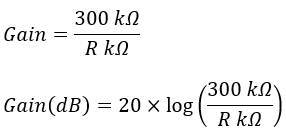
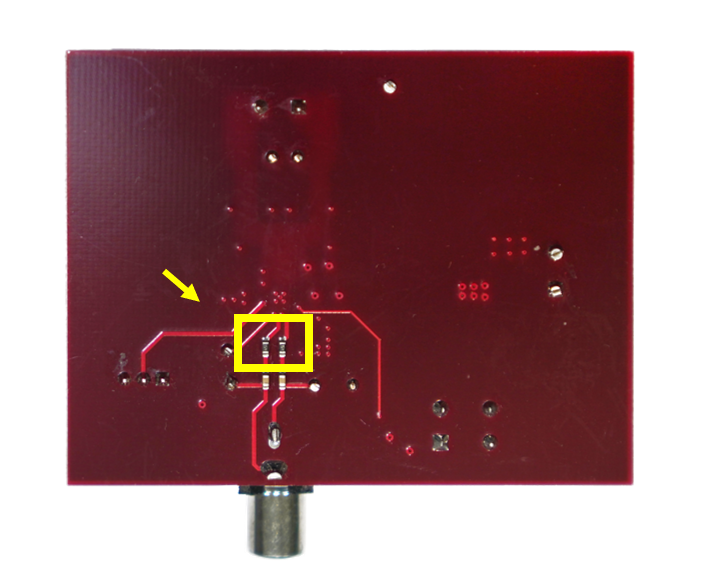
Users can adjust the output gain by changing R4 and R6 on the NT-NAU82011, as shown in Figure . R4 and R6 are set to 150kΩ by default, resulting in a default gain of 6 dB for the NT-NAU82011.
For more detail, please refer the user manual as below.
Resources
User Manual | Microcontrollers | Software Development Tool | Driver (BSP) | Programmer | Nuvoton Official Forum | Nuvoton eStore
*Ordering Number : NT-NAU82011
 粤公网安备 44030502010001号