
NuMaker-GestureAI-M55M1
|
1. |
硬件架设 |
|
|
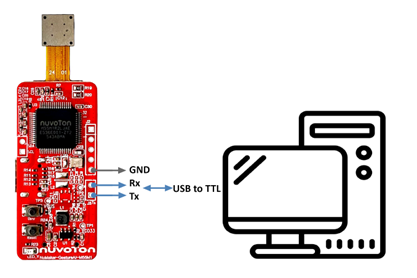
(1) 透过 PC 的USB TTL传输线连接开发板 UART5埠。 |
||
 |
||
|
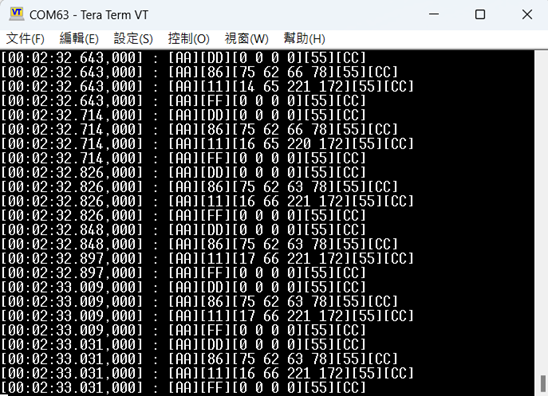
(2) UART5 的 Tx 和 Rx 会输出 Gesture(手势)的坐标与 Person(人体)的坐标。 |
||
|
2. |
用户可在终端窗口看到以下结果: |
|
 |
||
|
3. |
更新韧体方式,在个别开发环境下执行项目的方式请参考 用户手册. |
|
|
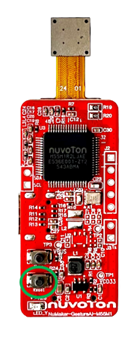
3.1 按住 User Define Button 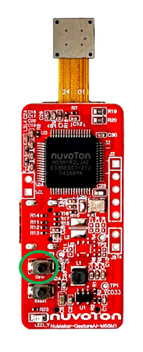 |
||
|
3.2 单击Reset 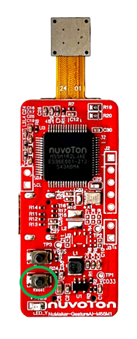 |
||
|
3.3 计算机会跑出Mass Storage USB 名称 : M55M1 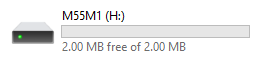 |
||
|
3.4 将想update 的 .bin檔放入 Mass Storage USB 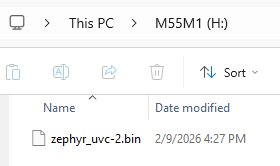 |
||
|
3.5 再按一次 Reset 即可更新 Firmware
更多资源链接 |
||
 粤公网安备 44030502010001号